
Balanced teams from six attributes
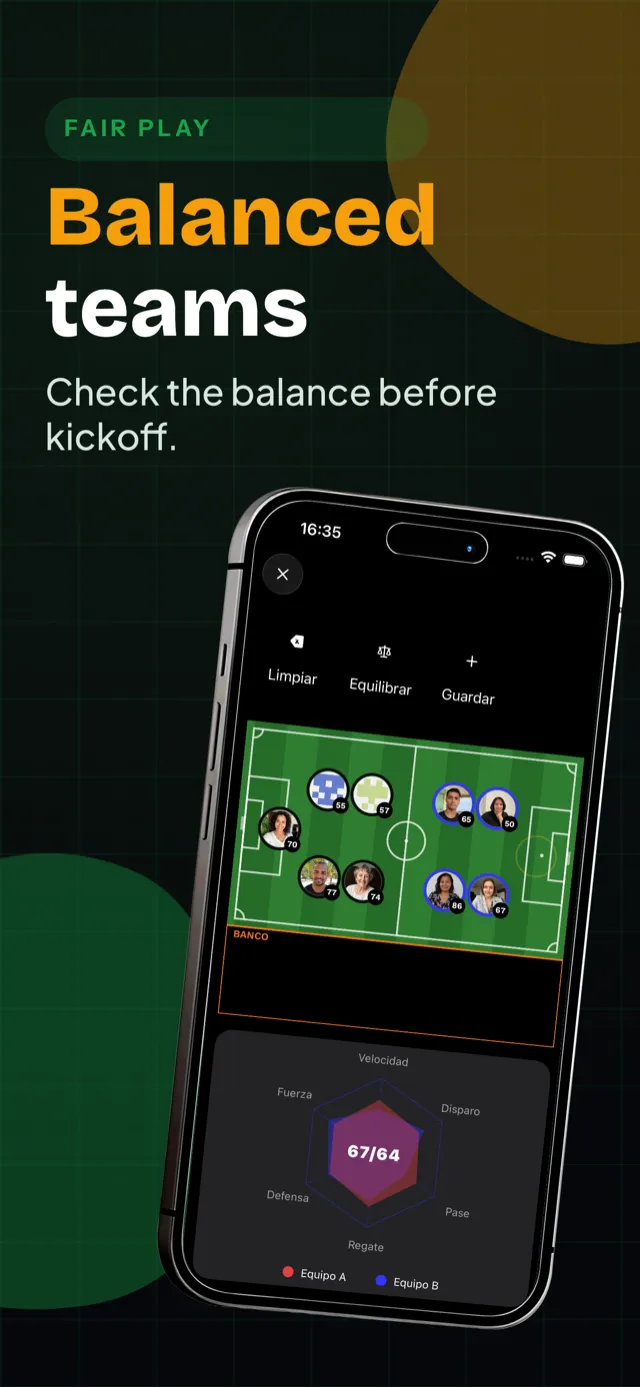
No more picking sides by hand. When the spots are full, the app splits the team and both sides show their average.

In summary
- When the last spot is taken, the app balances the sides from the confirmed players' attributes.
- Only players who confirmed they are playing are counted.
- You can simulate different lineups and preview each side's potential before kick-off.
How the split works
- When the last spot is taken, the app balances the sides from the confirmed players' attributes.
- Only players who confirmed they are playing are counted.
- You can simulate different lineups and preview each side's potential before kick-off.
- The captain can move a player and run the balance again.
Where the ratings come from
Every player has six attributes — pace, shooting, defence, physical, passing and dribbling — and they move with the team's feedback after each match. Inside your team you have a Yo Relativo: your level among these players.
Try it on the website
The 5v5 team balancer is a free tool on this site: add players, rate each one from 0 to 100 and press Auto-balance. It is standalone — it never reads from the app.
What it does and what it does not
Balancing uses your own team's ratings; it never compares you with other teams. Guests added as ghost players count with the attributes the captain gave them.
Related guides, features and questions
- Feature Call-ups, spots and waitlist Date, venue and cost in one notice. When the spots run out, the waitlist takes over.
- Feature Stats and table Goals, assists, streaks and the team table.
- Feature Ghost players Guests without the app keep their stats, and claim the profile when they install it.
- Guide Balance the teams The confirmed players split into fair sides from six attributes.
- FAQ How does team balancing work? The algorithm looks at all 6 attributes (pace, shooting, defence, physical, passing, dribbling) of confirmed players and builds the most balanced teams possible. You can simulate different lineups before the match and preview potential with radar charts.
- FAQ Can we weight the attributes? Yes. Each team decides how much every attribute matters — attack-minded or defensive — and every balancing run reuses those weights.
- FAQ Can I move a player by hand? Yes. The captain can drag players between sides and preview the result before locking the split.
- FAQ Someone dropped out after balancing. Now what? Run the balancing again: it only moves players who have not confirmed yet, so the sides you already built stay as they are.
- FAQ Who goes into the balancing? Only confirmed sign-ups. Ghost Players count like anyone else; players who have not confirmed are left out until they do.
- FAQ Which attributes does it track? Six: pace, shooting, defence, physical, passing and dribbling. They shape how a player is rated inside a team and how the sides are split.
Blog
- Blog Amateur football statistics 2026: 39 accounts, 24 teams One live count of amateur football: 39 accounts, 138 players, 24 teams and 291 matches, with the source, the denominator and the date of every number.
- Blog Amateur football team stats 2026: 5.8 players, 12.1 matches per team Squad size and matches per team, the two averages an amateur team is measured by: 138 players and 291 matches across 24 teams.
Frequently asked questions about Pachanga Community
Who is included in the balance?
Players who confirmed they are playing. Ask your team to confirm sign-ups before balancing.
Can I change the teams after balancing?
Yes. The captain can move players and run the balance again.
Is the website tool the same as the in-app balancing?
No. The website tool is a standalone 5v5 utility; the in-app balancing uses your team's own ratings.